
5 Signs You’ve Outgrown Shared Drives for Product Files
Salman Saqib on Unsplash
For many building product manufacturers, shared drives like Google Drive, SharePoint, OneDrive, and Dropbox start as convenient ways to store product files, but as your product lines grow, your team expands, and updates become more frequent, these tools can quickly become a bottleneck.
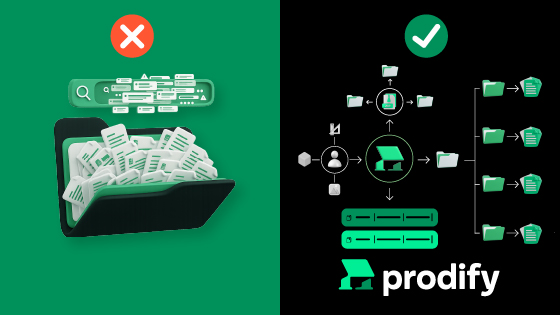
It might be time for you to adopt a centralized product management platform like Prodify—but how can you know for sure? Here are 5 signs you’ve officially outgrown your shared drive setup:
- You Have Multiple Versions of the Same File—and No One Knows Which Is Right
- Searching for Files Feels Like Hunting for Needles in a Digital Haystack
- Your Folder Structure Has Become a Maze No One Understands
- Sharing Files Externally Is a Constant Hassle
- Your Marketing and Sales Teams Can’t See Your CAD, BIM, & 3D Content
1. You Have Multiple Versions of the Same File—and No One Knows Which Is Right
Your teams regularly update technical design assets—CAD, BIM, and 3D files—as well as marketing materials, but shared drives offer no reliable way to ensure those updates reach everyone who needs them. Over time, this leads to multiple copies, inconsistent file names, and versions scattered across different folders.
The result is widespread inconsistency, and suddenly you can’t confidently say your product files are up to date across the organization—or out in the market. After all, when everyone manages their own version of "the truth," accuracy goes out the window.
Symptoms:
- "FINAL_V3_UPDATED_REVISED.pdf"
- Duplicated files saved in multiple folders
- AEC (Architecture, Engineering, and Construction) pros downloading and specifying outdated design files
- Marketers and sales reps maintaining their own folder of brochures
- Employees recreating files they couldn’t locate in the drive and storing them on personal computers
2. Searching for Files Feels Like Hunting for Needles in a Digital Haystack
95% of employees report feeling frustrated when trying to locate a file—and it’s no surprise. Shared drives simply weren’t built for complex product catalogs and don’t provide the structure or metadata needed to make large volumes of files easy to search. If your team spends more time searching for files than using them, you’ve officially outgrown your system.
Symptoms:
- Trouble recalling which folder a file is in
- Searching returns too many or irrelevant results
- Files are named inconsistently across individuals and teams
3. Your Drive Has Become a Maze No One Understands
Despite best intentions, your shared drive may have turned into a chaotic tangle of folders and files with inconsistent naming conventions. This often leads team members to avoid certain folders altogether because they’re too confusing, which slows everyone down and increases the risk of errors.
Symptoms:
- Inconsistent file names
- Duplicate product folders
- Randomly nested documents
- “Archive” folders that accidentally hide important, still-active files
4. Sharing Files Is a Constant Hassle
A staggering 85% of employees aren't confident that the information they share with customers and partners is current or accurate. Even internal sharing can be frustrating, with team members often needing to request to files they should already have.
Symptoms:
- Broken or expired links
- Recipients stuck behind permission walls
- No visibility into who viewed or downloaded files
- Files too large to send via email, or attachments getting blocked or flagged
- No way to preview CAD, BIM, or 3D files before sending them (making it hard to confirm they’re the correct versions)
Shared drives were never designed for manufacturers who regularly distribute product files to AEC professionals, distributors, and other partners. The result is a clunky, unreliable process that creates uncertainty for both your team and your customers.
5. Your Marketing & Sales Teams Can’t See Your CAD, BIM, & 3D Content
Your CAD, BIM, and 3D files are incredibly valuable to your marketing and sales teams. Marketers can use these assets to enhance visuals in campaigns, product pages, and brochures, while sales reps rely on them to share accurate technical resources with prospects.
The problem is that these files require specialized software to open and view—software your marketing and sales teams typically don’t have. As a result, they’re effectively blind to some of your most important assets.
Symptoms:
- No way to preview CAD, BIM, or 3D files before sending them, making it difficult to confirm they’re the correct versions
- Constantly needing to request visuals from technical teams
- Using outdated design file info for marketing materials
How Prodify Compares to Shared Drives
Check out the table below to see how Prodify stacks up against the shared drive tools most commonly used by manufacturers.
Why Manufacturers Are Moving to Prodify
Shared drives weren’t built for the way building product manufacturers work—but Prodify was. With Prodify, you get:
- A single source of truth for all product files
- Instant previews of your CAD, BIM, and 3D files with our built-in Visualizer tool
- Powerful version control with full file history
- Smarter search with custom tags, categories, and filters
- Easy sharing and integrations with public access links
- Analytics insights into who views and downloads your shared content
- Seamless collaboration across marketing, sales, and product teams