
9 Questions to Ask Before You Buy a PIM
Aalo Lens on Unsplash
Choosing a Product Information Management (PIM) system is one of the most important tech stack decisions a building product manufacturer will make. Why? Because your PIM becomes the home for every piece of product data you own, including dimensions, materials, colors, and pricing.
Bad product data isn't just annoying: Gartner research puts the cost of poor data quality at an average of at least $12.9 million a year per organization. Pick the right PIM and your team launches faster, stops chasing files, and gets in front of more specifiers. Pick the wrong one and you've bought a very expensive spreadsheet.
Pick the right one and your team launches faster, stops chasing files, and gets in front of more specifiers. Pick the wrong one and you've bought a very expensive spreadsheet.
Most PIMs were built for retail, but building products need something different. Here are 9 questions that will tell you, fast, whether a platform can do it.
- Can it handle how complex building products are?
- Does it speak CAD, BIM, and specs?
- Will it play nicely with your tech stack?
- How long until you're up and running?
- Are your data and your files in the same place?
- Will it get you in front of AEC specifiers?
- Can you see what's working?
- How does it keep old versions out of the wild?
- What will it really cost?
1. Can it handle how complex building products are?
A good PIM handles product families: one parent record with variant-level specs for every size, finish, and material. One building product family can mean hundreds of SKUs. That's normal for you, and a stress test for most PIMs.
2. Does it speak CAD, BIM, and specs?
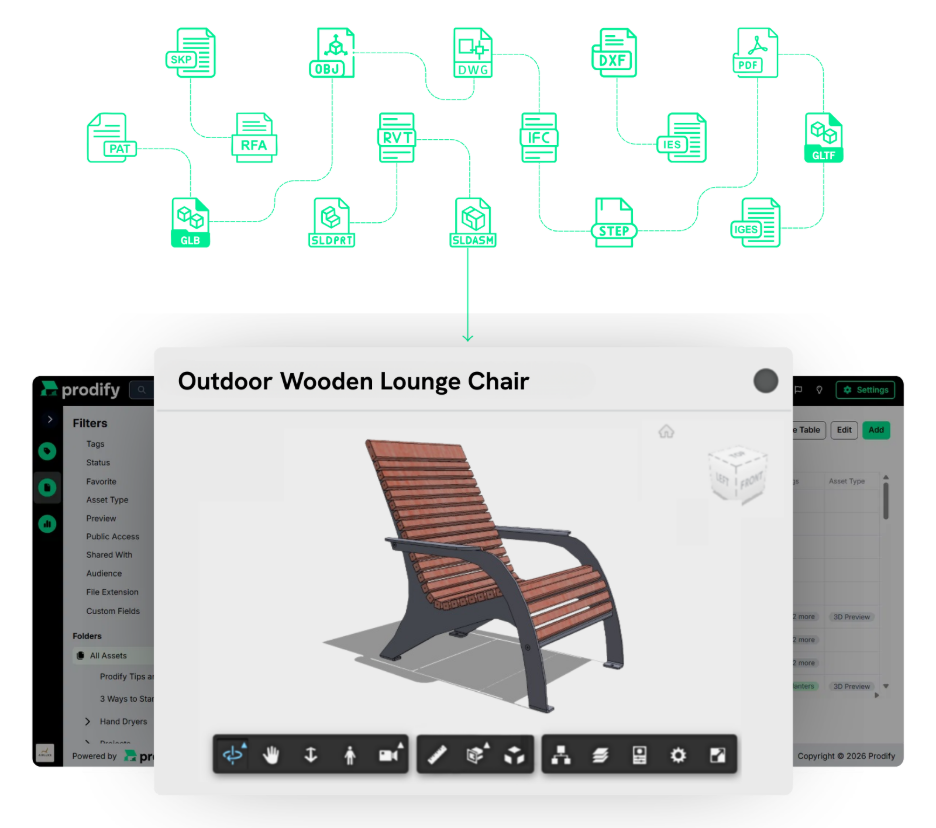
Architects and engineers can't specify what they can't drop into their model. That means your DWG, RFA, SKP, and IFC files matter as much as your product copy.
Check that the PIM can store, preview, and distribute those formats natively. A platform that treats them as generic attachments will cause headaches later.
Then ask the harder question: can your marketing and sales teams actually see what's inside those files? Most marketing and sales reps don't have Revit or AutoCAD on their laptops. If every preview means pinging engineering, you'll lose days on every campaign and sales conversation.
That's why we built Visualizer right into Prodify. Upload your CAD, BIM, and 3D files, pick the ones you want visualized, and Prodify generates clear, interactive previews. You don't need plugins, installs, or extra licenses.
How Visualizer pays off for the whole team:
- Marketing reviews assets at a glance, without waiting on engineering.
- Sales reps pull up technical visuals mid-conversation.
- Specifiers interact with a 3D preview before they commit.
- Updates you make in Prodify show up automatically in the shared version.
Ask the vendor: Can my sales team preview a CAD or BIM file without AutoCAD or Revit?
See your files come to life. Explore Visualizer →
3. Will it play nicely with your tech stack?
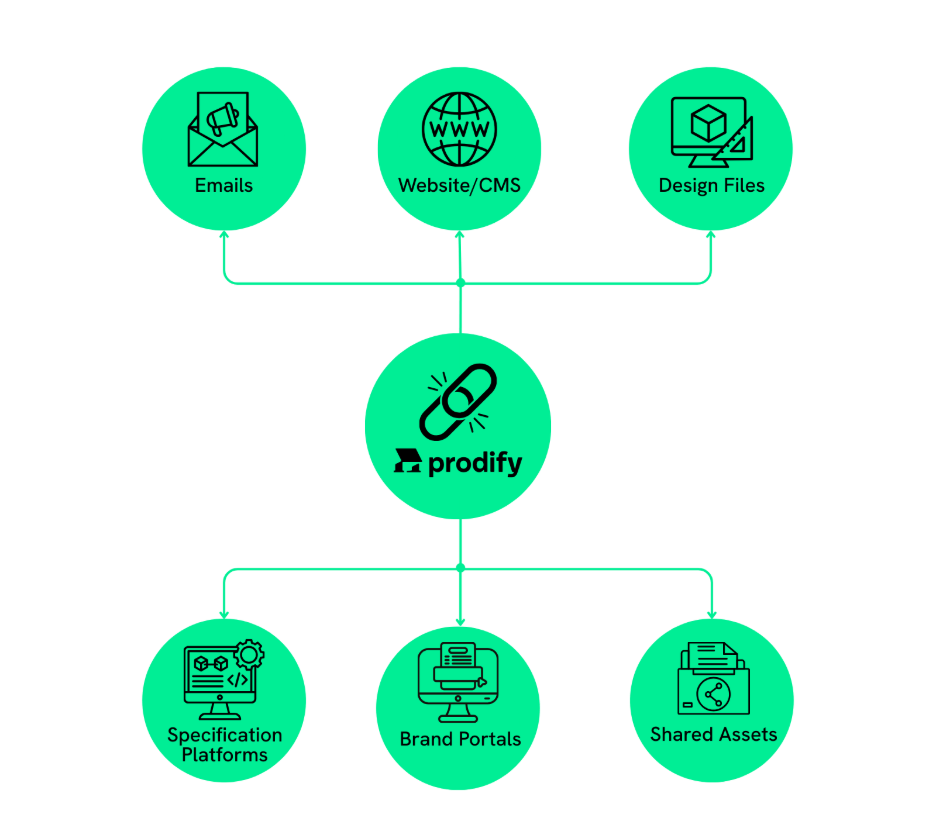
Your PIM has to talk to your ERP, your website, and your distributor portals. If it doesn't, you're back to double entry and version mix-ups. Ask for the integration roadmap and API details up front. What you want: one source of truth that pushes every update everywhere, automatically.
Ask the vendor: Which ERPs and other platforms do you integrate with today?
4. How long until you're up and running?
Expect weeks, not months, from a vendor with guided onboarding and building products experience. Some vendors need months of customization. Generic implementations tend to miss industry details, like product families and CAD/BIM file handling.
Ask the vendor: Who supports us during setup, and have you onboarded building product manufacturers before?
Check out Prodify's onboarding timeline here →
5. Are your data and your files in the same place?
They should be. A spec sheet needs its images, install videos, and compliance certificates linked to the same product. When files live in a separate system, outdated versions slip out to customers.
Look for a platform with DAM and PIM built together, so every asset stays linked to the right product. That's how Prodify's PIM and DAM work.
Ask the vendor: When I update a product, do its linked files update in the same place?
6. Will it get you in front of AEC specifiers?
Organized data is the means. Getting specified is the goal.
The best platforms don't stop at storage. They push your content straight to the specification networks where architects and engineers are already searching, like CADdetails.
Ask the vendor: Can I push content from my PIM to my owned channels? How easy is it to do?
7. Can you see what's working?
Your PIM should tell you which products get attention and which files get downloaded. That's how you decide what to update next.
Ask what the dashboards show and whether you can track engagement over time. Good analytics tell you where to put your effort. For marketing, that means knowing which product pages to refresh first. For sales, it means knowing which products specifiers are paying attention to.
Ask the vendor: Can I see downloads and views over the past 12 months?
See what Prodify analytics tracks →
8. How does it keep old versions out of the wild?
One outdated spec can cost you a specifier's trust or cause a real problem on a job site. A study from Autodesk and FMI surveyed more than 3,900 construction professionals and estimated that bad data may have cost the global construction industry $1.85 trillion in 2020. The researchers defined bad data as inaccurate, incomplete, inaccessible, inconsistent, or untimely. Decisions based on bad data accounted for an estimated $88.69 billion in rework alone.
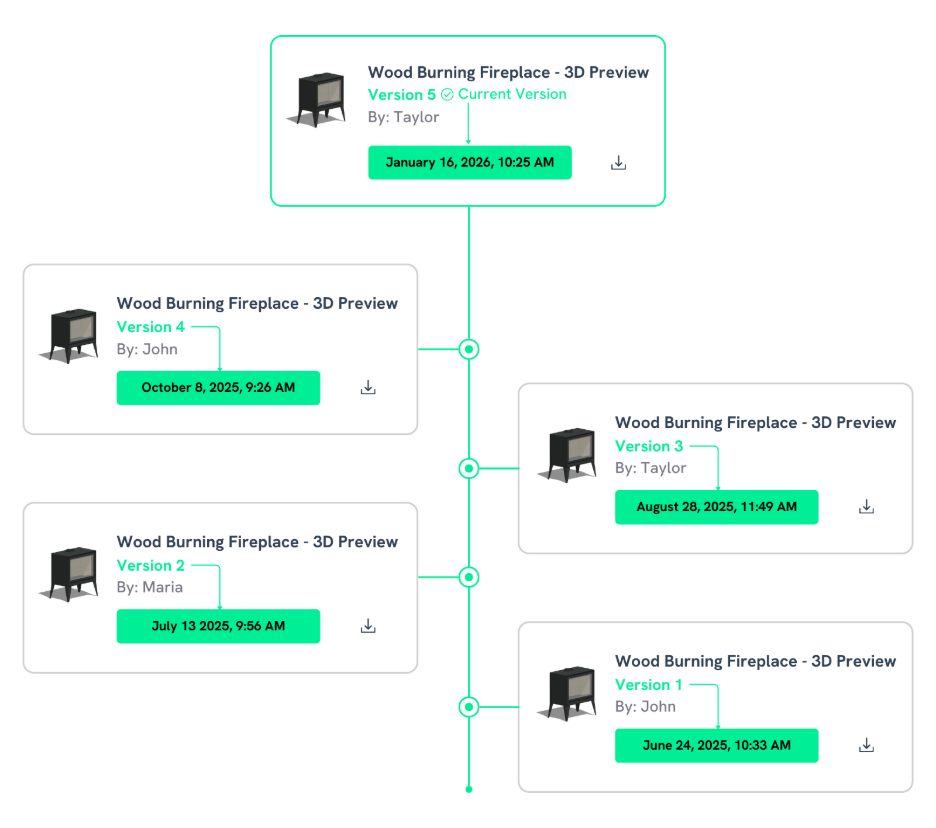
Your product data is part of that chain. Dig into version control and approval workflows. A good PIM ensures that every channel gets the same approved content, at the same time.
Ask the vendor: How can I keep track of previous versions of my files? How can I tell when a file is approved to share?
9. What will it really cost?
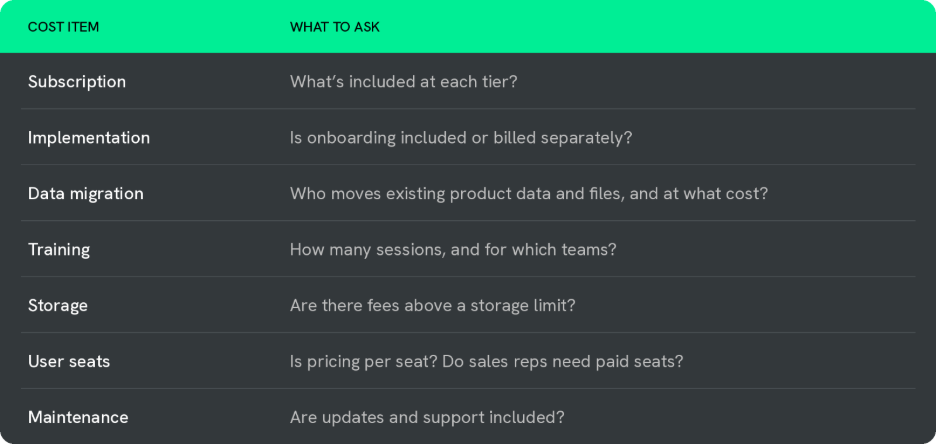
The real cost of a PIM is the subscription plus implementation, data migration, training, and maintenance. Ask for a full breakdown up front, so there are no surprises.
Buying a PIM for Building Products: Questions You Might Be Asking Yourself
You've got the questions to ask vendors. Here are the ones you're probably asking yourself.
Do building product manufacturers need a specialized PIM?
Yes. Building product manufacturers need native support for CAD, BIM, and 3D files, and most retail-focused PIMs don't have it. A specialized platform also understands how products get specified and helps you reach the architects and engineers doing it.
What's the difference between PIM and DAM?
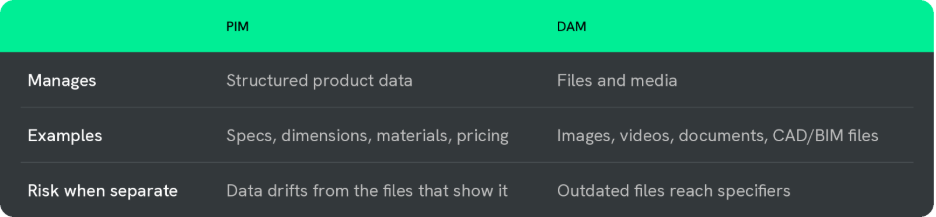
PIM manages structured product data. DAM manages files. You want both in one platform so your data and assets never drift apart.
Read our PIM vs. DAM guide for building product manufacturers →
How do I measure PIM ROI?
Measure PIM ROI with four numbers: time saved on updates, fewer errors from outdated info, faster launches, and more specifier engagement. Solid analytics make that value easy to prove.
Prodify: Built for Building Products
Prodify is an all-in-one DAM and PIM made for building product manufacturers. Your files and data live in one place and go out the door ready to get specified.
Retail PIMs don't know CAD/BIM from a JPEG. Prodify does. Book a demo today →