
AI Prompts for Building Product Manufacturers: A Use-Case Playbook
Clay Banks on Unsplash
AI can draft a spec section, a product description, or a follow-up email in seconds. For building product manufacturers, speed isn't the hard part. Accuracy is. One wrong fire rating, dimension or code reference can cost you a spec, a bid, or a customer's confidence.
And that confidence is already in short supply. In a recent survey of architects, 58% said they don't fully trust the product information manufacturers provide. AI won't close that gap on its own. Feed it incomplete or outdated data, and it will only make the problem worse. What separates generic AI output from content you can actually publish comes down to two things: a clear, well-structured prompt, and accurate product data to feed into it.
Below are copy-and-paste prompts for the six use cases we hear about most from manufacturer marketing, product and sales teams. Swap in your own product details wherever you see square brackets.
The 5 Parts of a Strong Prompt
Every prompt in this guide follows the same structure. Once you know it, you can write your own for any task.
- Role: tell the AI who it is, such as "a specification writer with 15 years in commercial construction."
- Product data: paste the real attributes, test results, certifications, and dimensions. Never let the AI guess.
- Audience: architect, contractor, distributor, homeowner or facility manager. Each one cares about different things.
- Format: word count, headings, bullets, table or CSI section format.
- Guardrails: "Use only the data provided. If information is missing, list it as a question instead of inventing it."
That last line is the most important one. It turns the AI from a creative writer into a careful assistant that flags gaps in your data.

Product Descriptions & Data Enrichment
Most manufacturers have hundreds or thousands of SKUs with thin, inconsistent descriptions. AI can draft consistent copy fast, as long as it works from your attributes.
Write a product description for architects
You are a technical copywriter for a building product manufacturer.
Write a 120-word product description for [product name] aimed at architects.
Lead with the main performance benefit, then cover key specs, certifications and typical applications.
Use only the data below. If something important is missing, list it as a question at the end.
Product data: [paste attributes, dimensions, test results, certifications]
Fill gaps in your product attributes
Review the product record below and identify missing or inconsistent attributes that architects and contractors typically need to specify this type of product.
Return a table with: attribute name, current value, issue (missing / inconsistent / unclear), and a suggested source for the correct value.
Do not invent values.
Product record: [paste record]
Create audience-specific versions
Rewrite this product description three ways: one for architects (performance and specs), one for contractors (installation and labour savings), and one for distributors (selling points and margins).
Keep each under 80 words and keep all technical facts identical.
[paste description]
Specifications & Spec Writing
Getting specified is the goal. AI can help you produce cleaner, more complete spec content, but a human with spec experience should always review the final version.
Draft a three-part spec section
You are a specification writer familiar with CSI MasterFormat and the three-part SectionFormat.
Draft Section [number and title] for [product name] with Part 1 General, Part 2 Products and Part 3 Execution.
Use only the product data and standards listed below. Mark any assumption with [VERIFY].
Product data and referenced standards: [paste data, ASTM/CSA/UL references, installation guidelines]
Want specs without writing the prompt yourself? Check out Spec Builder Pro, which turns your data into AI-generated specs in minutes.
Check a spec for gaps and weak language
Review this specification section as an experienced architect would.
Flag vague language, missing performance criteria, outdated standard references and anything that would let a lower-quality substitute pass.
Return a numbered list with the issue and a suggested fix.
[paste spec section]
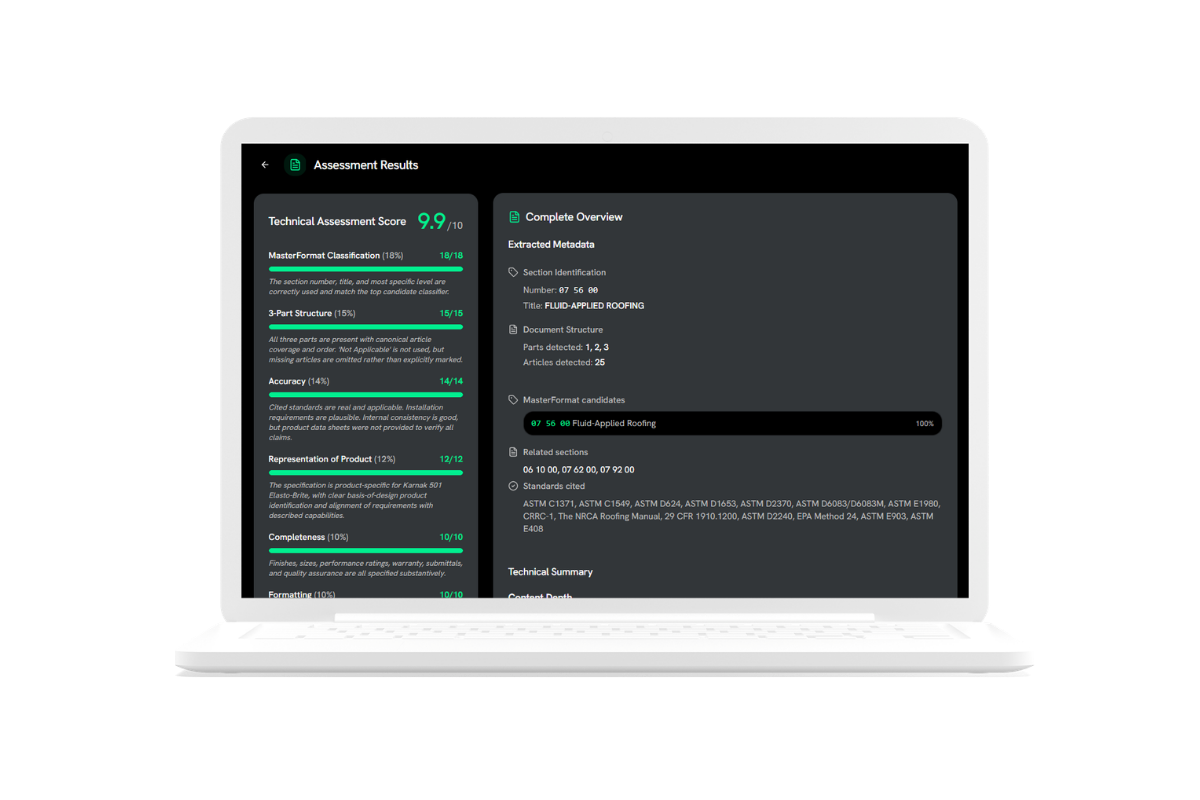
For a scored, in-depth review of your current specs, check out SPEC Analyzer, a free tool that grades your spec out of 10 and explains what to fix.
Build a product comparison for a substitution request
Compare our product with the specified product using the data below.
Create a side-by-side table covering performance, certifications, dimensions, warranty and installation.
Then write a short, factual summary explaining why our product meets or exceeds the specified requirements.
Our product: [data]
Specified product: [data]
Sales Enablement for Reps
Reps spend a lot of time hunting for the right document or rewriting the same email. These prompts turn product data into ready-to-use sales material.
Prep for an architect lunch-and-learn
I'm a sales rep for [company] meeting an architecture firm that designs [project type, e.g., K-12 schools].
Using the product data below, give me: the 3 benefits most relevant to that project type, 5 questions they are likely to ask with short answers, and 2 objections with responses.
Product data: [paste]
Write a follow-up email after a meeting
Write a short follow-up email to [name, role] after our meeting about [project].
Thank them, recap the two points they cared about most ([point 1], [point 2]), and offer the relevant files: [CAD, BIM, spec sheet].
Keep it under 120 words, friendly and professional.
Create a quick-reference battle card
Create a one-page battle card comparing our [product] with [competitor product] using only the data below.
Include: where we win, where they win, key proof points, and three talking points for reps.
[paste both data sets]
Marketing Content & AI Search Visibility
Your next specifier may meet your product through an AI answer before they ever reach your website. Forrester’s State of Business Buying 2026 found that generative AI searches are now the starting point for B2B buyers. The catch is that these answer engines often return incomplete or unreliable information, so buyers look for sources they can verify. Clear, structured, factual content makes your products easier for AI to recommend and easier for people to trust.
Turn a product into an FAQ page
Write 10 FAQs an architect or contractor might ask about [product], with clear 2–3 sentence answers based only on the data below.
Phrase questions the way people actually ask them, e.g., "Is [product] approved for exterior use in high-wind zones?"
[paste product data]
Draft a case study from project notes
Turn these project notes into a 400-word case study with the sections: Challenge, Solution, Results.
Include the project type, location, products used and any measurable results. Do not add numbers that aren't in the notes.
[paste notes]
Audit a product page for AI readiness
Review this product page as an AI assistant trying to recommend products to an architect.
List what information is missing, unclear or hard to extract (specs, certifications, dimensions, applications, downloadable files), and suggest specific improvements.
[paste page text or URL content]
Technical Support, Submittals & Compliance
Technical teams answer the same questions again and again. AI can draft first responses and assemble submittal content, with your experts doing the final check.
Answer a technical inquiry
You are a technical services rep for [company].
Answer this customer question using only the technical documents below. Cite which document each fact comes from.
If the documents don't answer the question, say so and suggest what the customer should provide (e.g., project location, substrate, wind load).
Question: [paste]
Documents: [paste installation guide, test reports, TDS]
Assemble a submittal package outline
Create a submittal package checklist for [product] on a [project type] project.
List each document needed (product data sheet, test reports, certifications, warranty, installation instructions, samples), whether we have it based on the list below, and what is missing.
Available documents: [list]
Summarize sustainability and compliance data
Summarize the sustainability and compliance information below into a one-page overview for an architect pursuing [LEED / WELL / other] on their project.
Include EPDs, HPDs, recycled content, VOC data and relevant certifications. Mark anything that has expired or needs updating.
[paste data]
Data Cleanup, Translation, & Channel Syndication
Your product data has to look right everywhere: your website, distributor portals, BIM libraries and spec platforms. AI is very good at the repetitive cleanup work that makes that possible.
Standardize messy attribute values
Standardize the attribute values in this list.
Use consistent units ([imperial / metric / both]), consistent naming for colours and finishes, and one format for dimensions (e.g., 24" x 48" x 1/2").
Return a table with the original value and the cleaned value. Flag anything you are unsure about instead of guessing.
[paste list]
Translate product content for a new market
Translate this product description into [Canadian French / Spanish / other] for [architects / contractors].
Keep all technical terms, standard references and units accurate. Use industry terminology common in [market], and list any terms that should be reviewed by a native-speaking technical expert.
[paste content]
Map your data to a distributor's template
Map our product attributes to the distributor template fields below.
Return a table: distributor field, our matching attribute, value, and notes on any field we can't fill.
Our attributes: [paste]
Distributor fields: [paste]
5 Common Mistakes to Avoid
- Letting AI fill in the blanks. If a value isn't in your data, AI may invent a plausible one. Always include the "use only the data provided" guardrail.
- Pasting outdated documents. An expired certification or old test report produces confidently wrong output. Make sure your source data is current.
- Skipping expert review. Specs, compliance claims, and technical answers should always be checked by someone who knows the product.
- Writing one-off prompts. Save the prompts that work as team templates, so everyone gets consistent results.
- Feeding AI scattered data. Copying attributes from five spreadsheets and three PDFs is slow and error prone. A single source of truth makes every prompt faster and more accurate.
Great Prompts Start with Great Product Data: Get AI Ready with Prodify
Every prompt above works better when your product data is complete, accurate and in one place. And that's exactly what Prodify is built for.
Prodify brings your digital assets and product information together in one platform designed for building product manufacturers. Your CAD and BIM files, specs, certifications and attributes stay organized, current and ready to use, whether you're writing a spec, briefing a rep, or prompting an AI assistant.
Want to see how AI Ready product data changes your team's workflow? Book a demo and we'll walk you through it.