
What's New in Prodify’s PIM: 4 New Features Built for Real Manufacturer Workflows
Jason Wang on Unsplash
A good PIM helps you manage your product data and can boost conversions by up to 50%. A great PIM goes further, connecting products and assets into one seamless experience with even stronger conversion potential.
A great PIM is also built specifically for you: building product manufacturers serving the AEC (Architecture, Engineering, and Construction) community. You don’t just need to manage product data, you need to present it in a way that makes it easy for AEC pros to discover, evaluate, and ultimately choose your products over competitors.
Here’s the good news: the next evolution of Prodify’s PIM is here, and it’s built for how your products actually get specified.
Think of it this way: Prodify’s PIM is your digital showroom, where your products are beautifully displayed and ready for AEC pros to explore. Behind the scenes, your team is in the workshop, organizing, refining, and perfecting every detail.
This isn’t just about managing product data anymore—it’s about creating unified, meaningful product experiences. Experiences that stick, because the AEC buying journey is long, and staying top of mind matters. This is what we mean by PIM purpose-built for your industry.
In this post, we’ll cover:
- Connecting the dots with product relationships
- Managing your assets from inside your PIM
- Turning your products into collections
- Tell your full product story with projects
- How these features support your day-to-day marketing workflows
Connecting the Dots with Product Relationships
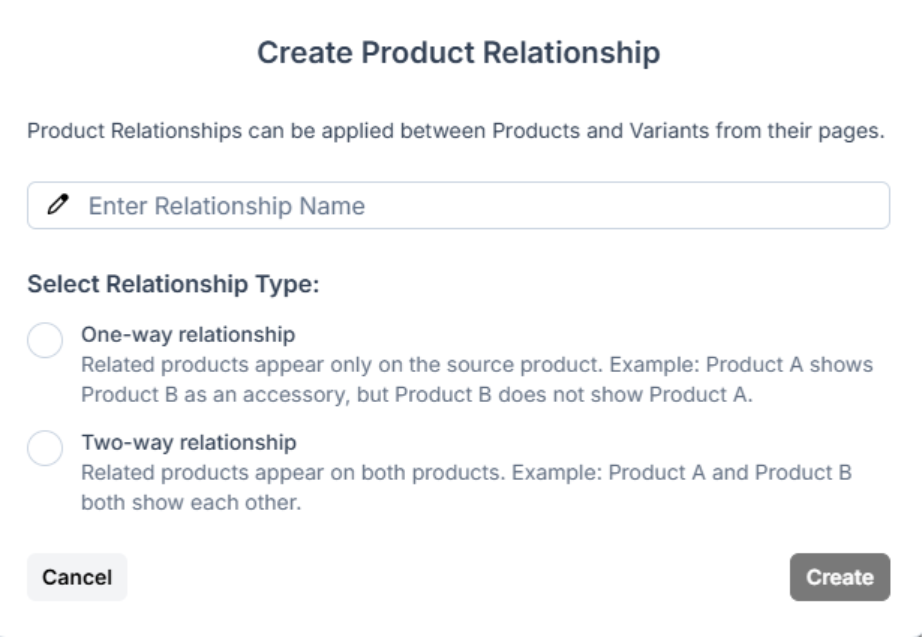
Manufacturers that offer systems, assemblies, and accessories aren’t just juggling products, they’re wrangling entire ecosystems. And for AEC pros, it’s never about picking a single item off the shelf. They need the full picture: what fits together, what finishes the job, and what swaps in when Plan A isn’t an option.
The problem? These connections are usually stitched together by hand, spread across spreadsheets, CMS pages, and sales docs. Things slip through the cracks, details get messy, and suddenly specifiers are missing key pieces or better alternatives.
With Prodify’s new Product Relationships feature, it’s easier than ever to define and manage those connections.
There are two types of relationships you can build:
- One-way relationships: The connection only shows on one side. For example, Product A can list Product B as an accessory, but Product B won’t show Product A.
- Two-way relationships: The connection goes both ways. Product A and Product B will both show each other.
Here are a few relationships you can build, along with real-world examples to show you how they work in practice:
One-way:
- Parent product → Child product
- Example: A lighting manufacturer links a main fixture (parent) to its variations, like different sizes, finishes, or mounting options (child products).
- Accessory → Product
- Example: A window manufacturer links accessories like screens, trims, or installation kits to a core window system.
Two-way:
- Product ↔ Compatible components
- Example: A door system is linked to compatible hardware (like hinges, handles, and locks), so both the door and the hardware reference each other.
- Product ↔ Alternative options
- Example 1: A flooring manufacturer links luxury vinyl tile to alternative finishes like engineered wood or laminate.
- Modular product ↔ Connectable products
- Example: A modular seating manufacturer links individual seating units (like corner pieces, middle sections, and end caps) so each component references the others, making it easy to specify a complete configuration.
Instead of locking your products into rigid, one-size-fits-all links, you can show how they actually work together. That way, prospects aren’t just picking a single item—they can quickly see how it fits into a full system. And when it’s easy to understand what goes with what, specifiers are far more likely to choose the complete setup, not just one piece of it.
Manage Your Assets Right from Inside Your PIM
When assets live in the wrong place, things quickly get messy. Fragmented workflows, incomplete product records, inconsistent branding, duplicated files, and version confusion all slow your team down.
But with this latest update, your assets now live exactly where they belong: right alongside your products.
Product-level asset organization in Prodify means that you can manage marketing materials, videos, design files, and more directly within your PIM. There’s no need to jump between systems. Behind the scenes, your PIM and DAM stay perfectly in sync, and your content is always up to date.
You can now:
- View and manage assets in a familiar table layout (just like folders in your DAM)
- Upload and link new assets
- Unlink existing assets
- Drag and drop assets directly onto products
- Apply assets to multiple products in bulk
- Set a main product image and organize supporting assets
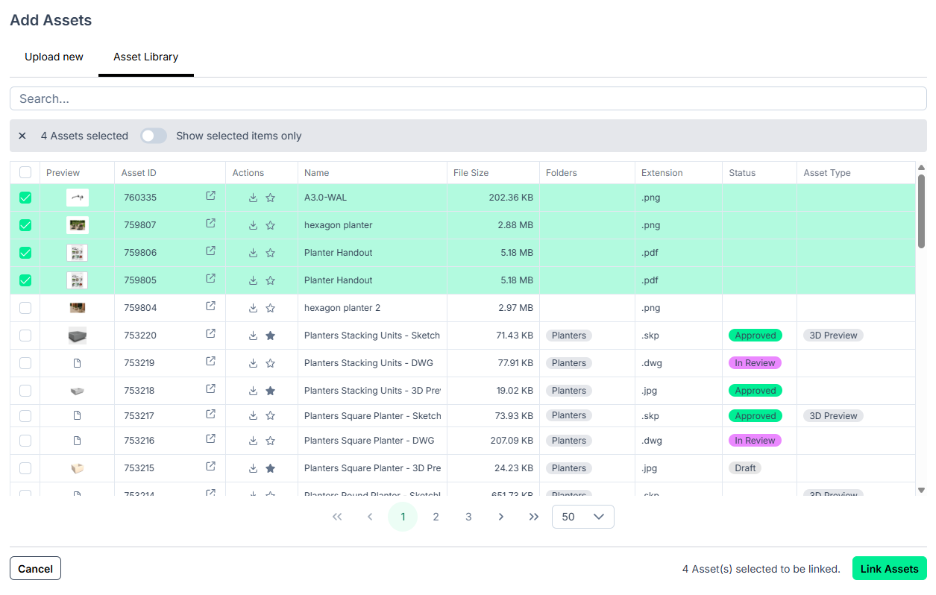
Plus, you can link a single asset to multiple products at once, saving time and ensuring consistency across your catalog. And when a product changes, you’re not left playing detective. You can instantly see which assets are affected and make the updates directly in Prodify. No more chasing down stray versions or worrying about outdated (or worse, non-compliant) content making it to prospects.
Better Together: Turn Your Products into Collections
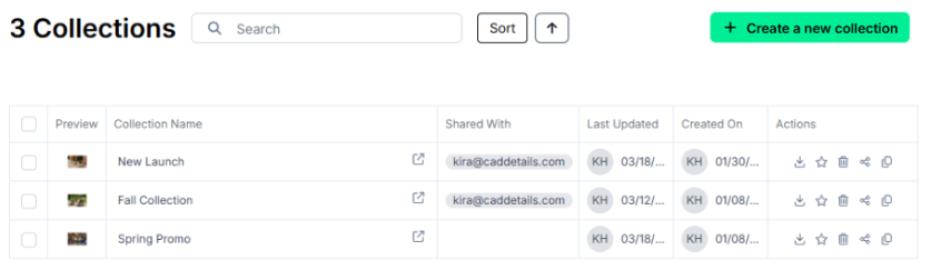
Most PIMs rely on rigid product hierarchies that often get in the way of sales and marketing workflows. These lead to workarounds, duplicated effort, and disconnected product information, making it harder to present an AEC-friendly picture of how your products actually fit together.
That’s why we introduced Collections, a flexible grouping system that aligns perfectly with the way your teams actually sell and market products, without disrupting your core data structure.
Collections give you the flexibility to organize your products in any way you want—by theme, use case, campaign... the possibilities are endless! Here are a couple ideas to get your started:
- Solution-Based: Bring everything needed for a specific space together, like a patio collection with all the elements for a complete outdoor living solution.
- New Product Launch: Showcase your latest products together so AEC pros can quickly discover and start specifying what’s new.
- Seasonal: Group products by season to support timely promotions and campaigns throughout the year.
- Eco-Focused: Highlight sustainable products with recycled content, low-VOC finishes, or certifications to support green building goals.
- Common Combos: Bundle complementary products, like doors with frames, hardware, and accessories, so users can view and specify the full system at a glance.
- End Market: Organize your products by the markets you serve (like commercial, residential, education, or interior vs. exterior), so AEC pros can quickly find what’s relevant to their current project.
- Audience-Specific: Tailor product groupings to specific AEC audiences or firm types. For example, you can create a landscape-focused collection for landscape architects, making it easier for your sales teams to present the most relevant products right off the bat.
Learn more about Collections here→
Tell Your Full Product Story with Projects
While Collections help you organize products, Projects take things a step further by bringing your products to life in real-world contexts. Instead of presenting products in isolation, Projects gives you a modern way to showcase how your products are actually used in curated, visual experiences that resonate with AEC pros.
And real-world proof works: 73% of the most successful content marketers use practical examples to influence prospects and drive sales.
Here’s what you can do in Prodify:
- Create visual card or table views
- Add cover images and galleries for a polished, presentation-ready experience
- Link real projects directly to your product catalog
- Bundle products into cohesive, shareable packages
- Preview, download, and share content externally
- Organize everything with tags, descriptions, and favorites
- Track AEC engagement with your projects (views, clicks, downloads)
Learn more about Projects here→
What These Updates Mean for Your Day-to-Day Workflows
Here’s how these 4 new PIM features make your marketing and sales efforts faster and more effective than ever before:
- Product Relationships
Spend less time manually connecting products and more time building complete, spec-ready experiences. By defining relationships once, you can scale them across your catalog, keeping everything consistent and connected without extra effort.
Problems solved: disconnected products, unclear relationships between products, missed opportunities to showcase complete systems
- Organizing Assets by Product
No more jumping between systems or digging through folders to find the right files. With assets organized directly at the product level, everything you need (specification sheets, images, videos, and more) is exactly where you expect it to be. This means less manual work, more time bringing products to market, and consistent branding across every channel.
Problems solved: scattered files, version confusion, duplicate assets, and time lost searching for the right content.
- Collections
You can spin up collections in minutes, without needing to restructure your catalog or rely on other teams. Whether you’re building a landing page, sending an email, or supporting a sales conversation, you can quickly pull together a curated set of products that tells a clear, cohesive story.
And once an AEC pro has found one product, collections help them stop searching and simply continue specifying the products you’ve grouped together. By surfacing products that are frequently used together, collections create natural opportunities for upsell and cross-sell that can boost revenue by up to 30%.
Problems solved: rigid product hierarchies, slow campaign setup, and missed upsell opportunities.
- Projects
Instead of marketing products one by one, you can showcase them in real-world contexts, making them more compelling and easier for AEC pros to connect with. By highlighting completed projects (like outdoor terraces, commercial lobbies, or healthcare spaces) alongside the exact products used, you’re not just telling specifiers what your products can do—you’re showing them what they’ve already done.
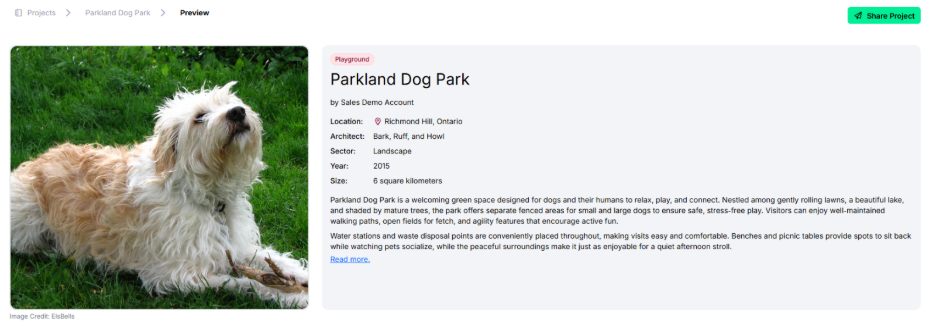
With built-in engagement tracking, you can see exactly which projects and products are driving interest and use those insights to refine your outreach strategy.
Problems solved: flat product storytelling, lack of real-world context, and limited visibility into content performance.
Say Hello to a Smarter, More Connected PIM
Here’s the reality: many marketing, sales, and product teams in manufacturing are juggling scattered assets, disconnected product data, and constant back-and-forth just to keep everything aligned, so they turn to a PIM.
But traditional PIMs rely on rigid hierarchies that don’t reflect how your building products are actually used. Prodify goes further. With this latest update, we’re moving beyond fixed structures toward a more flexible, contextual approach to managing your catalog.
Product relationships show how items fit together. Assets live alongside the products they support. Collections make it easy to present complete solutions. And Projects bring it all to life, showing exactly how your products perform in practice.
This is the shift Prodify is built for: moving beyond rigid hierarchies to a dynamic, connected ecosystem where your team can work faster, stay aligned, and deliver better product experiences.
Prodify’s PIM is a smarter, more connected way to manage and showcase your products to the AEC community.