
Digital Asset Metadata for Manufacturers: A Practical Guide
Digital asset metadata for manufacturers is the info that rides along with every product file: SKU, product family, finish, fire rating, file format, and revision date. Get it right, and your marketing team finds the right CAD drawing, BIM model, or spec sheet in seconds. No folder spelunking required.
Let's be honest: most manufacturers aren't there yet. Product files are scattered across a shared drive, a few inboxes, and that one laptop nobody else can log into. All that hunting adds up. In Atlassian's 2025 State of Teams survey of 12,000 knowledge workers and 200 executives, teams reported spending about 25% of their time just searching for answers.
Your buyers feel it too. Over the past 12 months, 72% of the sessions in which registered U.S. and Canadian AEC (Architecture, Engineering, and Construction) professionals searched or filtered on CADdetails included at least one filter. Here's the catch: filters only work when your files carry clean, consistent metadata.
This guide walks marketing teams through building a metadata structure that keeps files easy to find, keeps your brand on point, and keeps your product content ready wherever architects and specifiers go looking.
Key Takeaways
- Metadata turns a scattered pile of product files into one library your whole team actually trusts.
- A controlled vocabulary (one approved term per value) is your best defense against duplicate files and mystery product names.
- Eight facets cover what most building product manufacturers need to tag, from product identity to distribution channel.
- Governance keeps things tidy as your catalog grows: one owner, sensible approval rules, and a quarterly check-in.
- ChatGPT and Claude can only use your metadata when the same clean attributes show up on your public product pages.
What Is Digital Asset Metadata for Building Products?
Think of digital asset metadata as the label on every file: what it is, which product it belongs to, and how it should be used. For a building product manufacturer, that usually means product name, SKU, product family, material, finish, fire or acoustic rating, certifications, file format, and revision date.
It does a lot more than a folder name ever could. A folder called "Curtain Walls" tells you a category. Metadata on a single DWG file tells you the product family, the finish, the fire rating, and whether it's the latest revision.
The bigger your catalog, the more it matters. Once you're juggling hundreds of SKUs, each with multiple finishes and file types, metadata is what ties every file to its product record. Without it, your team is left guessing which "final_v3" is actually final.
Why Metadata Matters for Manufacturer Marketing Teams
Metadata decides whether your team, your distributors, and your AEC buyers find the right file on the first try. When it's a mess, three things go sideways.
1. The wrong file goes out: If a sales rep can't find the current cut sheet, they send whatever's sitting in their inbox. If marketing tags a product photo "ACP-400" and the technical team calls it "ACP400," you now have two records for one product.
2. Your brand starts to wander: A distributor grabs a photo with last year's color palette. A regional team uses a logo that's two versions old. Each slip chips away at your credibility with the architects and specifiers you're working to win over.
3. Your products get harder to find: AEC pros don't browse folders. They filter by attribute. Here's how registered U.S. and Canadian AEC pros filtered on CADdetails over the past 12 months:
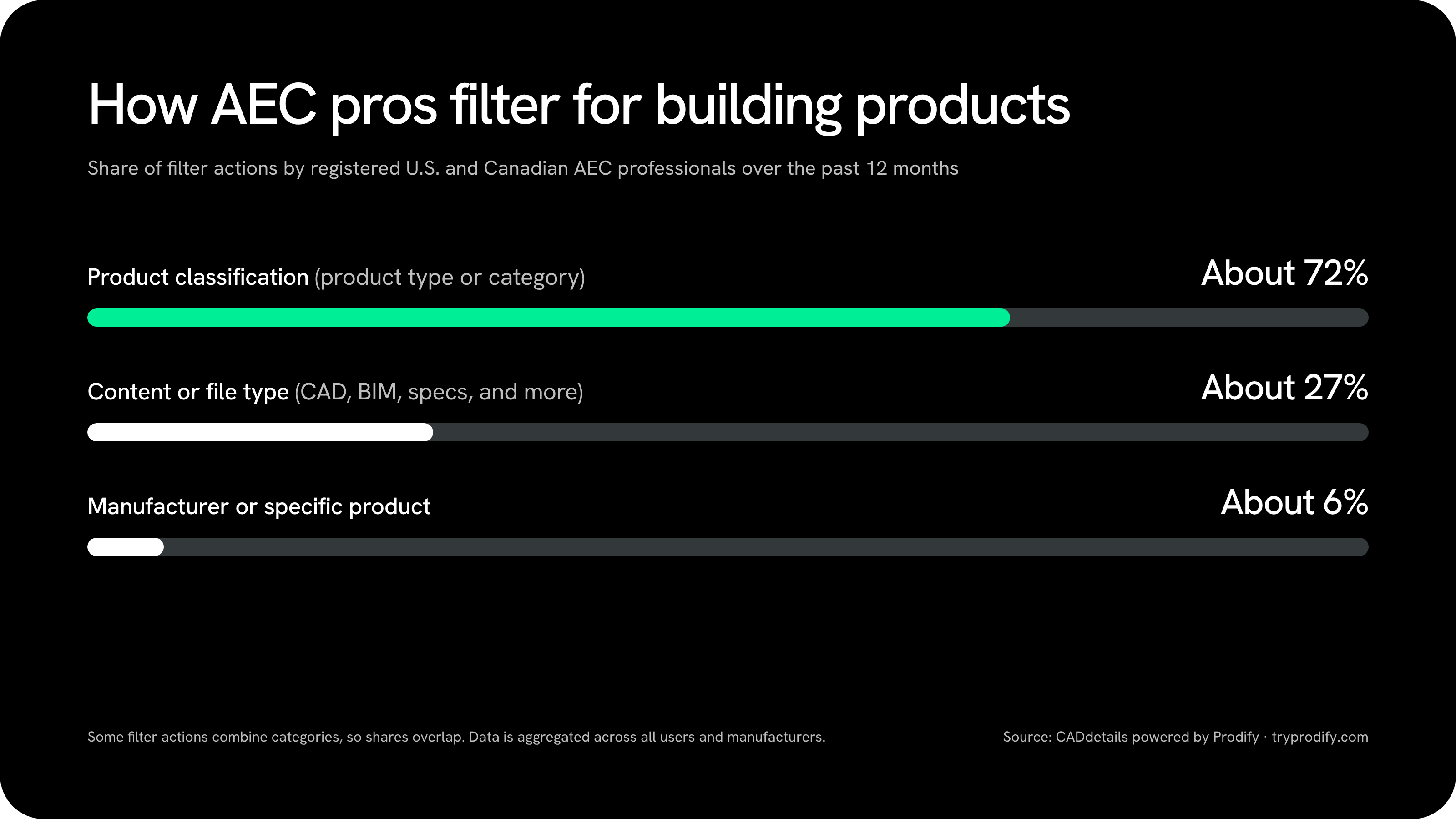
Every one of those filters runs on metadata. If a file isn't tagged with the right classification and file type, it simply doesn't show up. Untagged means invisible.
And yes, it adds up fast. As an illustration: if one product averages $50,000 per project and your team misses two specifications a month because the right file was hiding, that's $1.2 million a year left on the table.
What Should a Manufacturer's Metadata Taxonomy Include?
A taxonomy is the system that sorts every attribute in your library. A strong metadata taxonomy covers eight facets: product identity, technical specifications, compliance, file type, revision history, application, distribution channel, and brand identity. Each facet works on its own, so someone can filter by product family and file type at the same time.
Try to stop at eight. Every extra facet is one more field your contributors fill in on every single upload, and that's how shortcuts sneak in.
Two facets deserve a little extra love from marketing:
- Product identity has to match everywhere. If your website says "ACP-400" and a distributor portal says "ACP400," people and AI tools may think they're two different products.
- Distribution channel tells your team which files are good to go public and which are still in review. It's the facet that keeps a draft spec sheet from landing in a specifier's inbox.
How to Build a Digital Asset Metadata Structure in 6 Steps
Here's the short version: take stock, pick your words, sort them into facets, test small, let your platform do the enforcing, and get everyone on the same page. Now for the longer version.
Step 1: Audit your existing assets & naming
Start with an inventory of every product asset your teams touch: where it lives, what it's called, and who owns it. Think CAD drawings, BIM models, spec sheets, product photos, and certifications. Flag the duplicates, plus every spot where two teams call the same thing by different names ("brushed aluminum" vs. "aluminum, brushed," we're looking at you).
Step 2: Define your controlled vocabulary
A controlled vocabulary is your official list of approved terms for each metadata field. "Brushed Aluminum" makes the list. "Aluminum, brushed" and "Brushed Alum" don't. Stick to words your teams and specifiers actually say out loud, and leave the internal jargon at the door.
Step 3: Design your faceted taxonomy
Sort your approved terms into the eight facets above. Facets outlast folders because folders bake in today's org chart, while facets describe the product itself. Reorganize a team, and your tags don't even blink.
Step 4: Pilot on one product line
No need to boil the ocean on day one. Test your taxonomy on one product family with a realistic mix of SKUs, file types, and regional variations. A few hundred assets is usually plenty to surface the gaps. Tweak your vocabulary and facets, then roll out to the full catalog.
Step 5: Configure your DAM & PIM platform
Your taxonomy needs a system that actually enforces it. A shared drive can't require fields, check entries against an approved list, or link a file to its product record.
That's where Prodify comes in. It combines a DAM and a PIM in one platform built for building product manufacturers. Every file links to its product record, and custom tags and statuses map to your controlled vocabulary.
Curious how your product files would map to these eight facets? Book a Prodify demo and we'll walk through it with your own catalog.
Step 6: Document the rules & train your team
Write a short, friendly metadata guide that lists your controlled vocabulary, facet definitions, and which fields are required versus optional. Walk your marketing, sales, and technical contributors through it, and include real examples of common tagging slip-ups so nobody has to learn the hard way.
How to Keep Metadata Accurate as Your Catalog Grows
Metadata stays accurate when someone owns it, approvals match the risk, and the library gets a regular checkup. That's metadata governance in a nutshell. Skip it, and off-list terms creep in while expired files quietly stay live.
Name a metadata steward: One person keeps the controlled vocabulary tidy, approves new terms, and settles naming debates. Part-time contributors from marketing, sales, and technical teams handle tagging in their own lanes.
Match approvals to risk: Not every file needs the full red-carpet review:
Check in quarterly: Keep an eye on four numbers: metadata fill rate, search success rate, duplicate asset count, and approval cycle time. If fill rate dips or duplicates climb, it's time to revisit your vocabulary or training.
Retire old files on purpose: Give every asset a review or expiry date at upload. When a certification lapses or a product is discontinued, archive the file. Prodify's version control and auto-updating public links mean every channel that links to a file always shows the current approved version. Here's how Prodify's public links work with your website→
How Does Metadata Help AI Recommend Your Products?
Metadata helps AI tools like ChatGPT and Claude when it shows up as consistent, readable product info on pages those tools can actually reach. That's where all your metadata work pays off. When one product name, one SKU format, and one set of attribute names flow from your DAM and PIM to every public channel, AI tools get a clear picture of each product. When your website says "ACP-400" and a distributor page says "ACP400," they get two blurry half-pictures.
And no, ranking on Google isn't a free pass. An Ahrefs study of 15,000 prompts found that only about 8% of the URLs ChatGPT cited in its answers also ranked in Google's top 10 for the same prompt. Clean, consistent product content gives these tools more to work with, whatever your ranking.
Because Prodify connects DAM and PIM, file-level metadata and product records stay in sync. Want to go deeper? See how Prodify helps AI recommend your products→
Common Metadata Mistakes Manufacturers Should Avoid
Good news: the most common metadata mistakes are totally avoidable. Here are the big four, and every one is cheaper to prevent than to clean up.
Get Your Digital Asset Metadata Right
Great metadata comes down to three moves: agree on one vocabulary, sort it into facets, and put someone in charge of keeping it clean. Nail those, and your team stops chasing files, your brand stays consistent, and your products show up when AEC pros start filtering.
Prodify handles both halves of the job: a DAM for your CAD drawings, BIM models, and spec sheets, and a PIM for the product data behind them. And through CADdetails powered by Prodify, that content reaches 750,000+ AEC pros across North America.
Ready to see where your metadata stands? Book a Prodify demo and we'll show you what it takes to get your product files in shape.
FAQs
What is digital asset metadata?
Digital asset metadata is the info attached to each file, like product name, SKU, material, certification, file format, and revision date. It makes files searchable and easy to identify without opening every single one.
Why do building product manufacturers need a metadata taxonomy?
A metadata taxonomy gives every team one shared way to tag product files. Without it, departments invent their own names for the same product, and you end up with duplicate files, dead-end searches, and mixed messages reaching specifiers.
What is the difference between a controlled vocabulary and freeform tagging?
A controlled vocabulary allows only approved terms for each field, so "Brushed Aluminum" is the one and only accepted entry. Freeform tagging lets anyone type anything, which splits one attribute into a pile of variations and breaks search.
Who should own metadata at a manufacturer?
One metadata steward should own the controlled vocabulary, approve new terms, and settle naming debates. Contributors from marketing, sales, and technical teams tag assets in their own areas and follow the steward's playbook.
Can metadata help ChatGPT and Claude recommend my products?
Yes, indirectly. ChatGPT and Claude can't peek inside your DAM, but they do read the product content you publish. Clean metadata keeps product names, SKUs, and attributes consistent on every public page, which gives these tools a much clearer picture of each product.
How does Prodify help with metadata management?
Prodify combines a DAM and a PIM built specifically for building product manufacturers. It links every file to its product record, supports custom tags that match your controlled vocabulary, and keeps public links pointed at the current approved version.